


MAXQDA 質性資料分析軟體
.jpg)
如果您需要分析文本並對任意主題加以評價和流覽,MAXQDA將成為您最好的幫手。它的優點有很多,比如強大的編碼功能;直觀性;您可以直接在文本中書寫 批註或心得,存於專門的“備忘錄”中,十分方便以後的輕鬆查找和處理;您可以隨意創建資料間的簡單或複雜關聯並建立矩陣資料,在矩陣流覽器中直接閱讀和處 理這些資料,並可以以其他形式保存在MAXQDA以外的硬碟空間中等等。此外,在MAXQDA中使用和處理的資料可以為任意文本形式,如訪談對話,期刊文 章,病歷,觀察記錄,在標準化調查訪問中對開放性問題的回答以及更多。
什麼是MAXQDA?
MAXQDA是一個獨特的定性資料分析軟體程式,它允許使用者有系統地組織、評估和詮釋 文本以及多媒體資料。作為一個用於經典QDA和知識管理的強大工具,從1989年第一個版本發佈以來,MAXQDA就一直是世界各地的學術及研究機構、個人和企業的選擇。
適用於全世界所有語言
從幾年前開始MAXQDA就能夠處理全世界所有語言的資料。因為它是為數不多的真正使用Unicode編碼的質性分析程式,您不僅可以用任意語言讀取您的資料,還可以用該語言運行辭彙搜索、類別定義等功能。
它是如何工作的?
MAXQDA允許使用者編碼、分類、視覺化以及共用其系統評估和詮釋中從文本到訪談再到多媒體的各種資訊。結合簡單性和複雜性,MAXQDA保證了直觀的、人性化的操作,同時提供了廣泛的功能應用。簡單地導入您的檔—— PDF檔、視聽檔、訪談、表格或者RIS檔——然後開始編碼。從結構清晰的介面您能夠視覺化您所有的資料,管理您的檔,創建備忘錄、統計性表格和圖表、可視性輔助工具,以及更多。
MAXQDA並不限於特定類型的研究,而是可以用於各種不同的方法,例如內容分析法、紮根理論以及混合方法。
高效、功能強大、直觀,MAXQDA提供了豐富的功能和高度發達的視覺化工具,並與MS Office和Internet應用程式融合得渾然一體。優質的服務和高穩定性,例如在多種不同語言下的功能應用,是MAXQDA區分于其它文本分析工具的獨到之處。
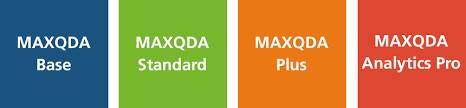
定性文本分析 - 基本 (MAXQDA Bace或更高版本)
導入文本或PDF文檔或在MAXQDA寫下筆記。使用全套的MAXQDA編碼功能,寫備忘錄,搜索詞,在文件或外部來源鏈接,並保持的重要研究步驟的日誌。基本變量功能包括人口統計學數據或其他變量添加到文檔。可視化代碼的頻率或代碼共生,創造圖表和圖示。
先進的定性數據分析(MAXQDA Standard或更高版本)
更多的數據類型,包括焦點小組,調查,網頁,文檔prestructured,傳記資料的工作。直接連接到Twitter。錄製,分析和代碼的音頻和視頻文件的多媒體播放器。建立和地圖視圖重新編碼系統。匯總數據編碼成自己的語言和使用單詞組合和編碼數據的高級搜索。全混合方法工具框可供選擇,包括交叉表,聯合顯示,相似性分析等。創建具有強大的映射工具MAXMaps免費或自動的概念圖。與團隊成員的項目數據共享的元素和分析者間的協議。出示您的研究,以他人具有豐富的可視化選項和出口數據,以專業的報表創建者。
定量文本分析(MAXQDA Plus或更高)
分析所有的數據中的使用,用戶自定義詞典的話。MAXQDA加使研究人員能夠進行專業的基於字典的分析,詞彙分析和定量內容分析。
統計數據分析(MAXQDA Analytics Pro)
統計分析的定性數據和大範圍的統計工具來評估你的發現或您的數據連接到外部數據集(Excel中,SPSS)。計算頻數表,均值,中位數,標準差,平均誤差,置信區間等分析交叉表:卡方和克拉默五,相關:Pearson的R,斯皮爾曼的RHO。分析秤方差和可靠性分析。互動結果顯示。
The clearly structured main screen of MAXQDA is divided into four main windows which reflect essential management work areas in the process of qualitative data analysis:
- the complete data set (“Text groups” window),
- the code- or category system (“Code system” window),
- the single text, always directly accessible (“Text Browser” window), and
- the field for performing basic and complex searches, theoretical concept verification (“Retrieved Segments” window).
All essential management functions are directly embedded in each respective window. Further functions and short cuts are accessible via the upper menu bar. The fully integrated add-on module for analysis of vocabulary and content MAXDictio, as well as the visual tool MAXMaps are also available in this menu.
MAXQDA distinguishes itself from other text analysis tools through its high efficiency and stability, its elaborate functionality and its user friendliness. The program’s simplicity does not, however, imply a lack of sophistication: MAXQDA proves that high technical standard and power can be combined with simple and intuitive use. This strength is in large part due to the following characteristics:
- clear and neat program structure,
- extensive and differentiated functions combined with a unique and highly-advanced visualization available for the processes of coding, memo-writing and browsing, and
- seamless integration into the world of MS Office and MS Internet Explorer.
Overview of Pivotal MAXQDA Functions:
- Work with manuscripts in rich text format (.rtf). Texts can be created and edited at any time and can be imported in rich text format (no need for pre-formatting).
- Import texts from the Internet using “drag-and-drop”.
- Create groups and organize textual material.
- Build temporary analysis text sets for specific interpretations.
- Create a hierarchical code (category) system with up to ten levels.
- Select and code text segments and assign codes or sub-codes from the code system.
- Define text units while coding.
- Attach a weight score to text segments indicating their relevance to the research.
- Select words or terms in the manuscript and insert them automatically into the code system (”in-vivo-coding”).
- Search for words and strings or combinations of words and strings in the text or its subgroups.
- Display search results as “keywords in context”.
- Code search results automatically.
- Keep track of ideas and hypotheses by writing memos.
- Work with memos using the elaborated MAXQDA Memo Manager and search through them with the MAXQDA lexical search tool.
- Attach special icons to the different types of memos (”theory memos”, “methodological memos”, etc.).
- Print texts with codings on the edge of the text.
- Link a memo to as many codes as you want to relate it to.
- Define quantitative variables and use them in combination with texts and code words.
- Export the table of variables to statistical programs or Excel.
- Import a table of variables from Excel or SPSS.
- Pre-code text segments, for example for the analysis of open-ended questions in questionnaires.
- Work together in teams and use special teamwork functions.
- Create a backup of a whole project or study and send it to colleagues via the Internet.
- Merge projects, for instance in qualitative panel analysis.
- Use a set of ten strongly improved and illustrated analytical functions for text retrieval (”near”, “surrounded by”, “followed by”, “at least”, etc.).
- Get support from a detailed online handbook.
- Use different coders in one project; codings can be faded out.
- The Code Matrix and Code Relation Browser create an overview of the coding distribution and show overlaps: both allow direct access to the corresponding text segments.
- Put text segments and memos back into context; assigned memos and text segments can be shown in their original context at any time.